Palla POS
Designing a faster, simpler POS system for nail salons by improving scheduling, queue management, checkout, payroll, reporting, and daily operations.
Overview
Palla POS is a tablet-first salon management system designed specifically for nail salons. The project focused on reducing front-desk friction and creating a more connected workflow between booking, queue management, checkout, payroll, reporting, and station visibility.
Project Snapshot
The Problem
Existing salon POS tools are often slow, cluttered, and frustrating during busy hours.
The Goal
Create a faster, more intuitive system for scheduling, queue flow, checkout, and operations.
My Role
Led UX and product design, defining flows, screen structure, interaction priorities, and visual direction.
Outcome
Designed a connected product concept tailored to real salon workflows and high-frequency tasks.
The Problem
Many nail salons rely on outdated POS systems that interrupt work instead of supporting it. Common issues include lag during busy hours, confusing booking interfaces, poor queue visibility, cluttered layouts, and too many disconnected tools. In a fast-paced salon environment, these problems can create delays, missed details, and stress for both staff and customers.
- Slow systems during peak hours
- Confusing appointment and booking flows
- Too much friction for common tasks like assigning technicians and checking customers out
- Limited visibility into performance, payroll, and station status
Design Goal
The goal was to design a POS experience that feels fast, clear, and operationally useful. Rather than designing isolated screens, I focused on connected workflows that reflect how nail salons actually operate day to day.
- Reduce front-desk friction
- Simplify booking and queue management
- Support fast checkout
- Improve visibility for staff and managers
- Keep the interface clean and easy to scan
My Approach
I approached this as a workflow design challenge, not just a UI exercise. The product needed to support walk-ins, appointments, multiple technicians, station availability, tips, payroll, and reporting in one connected system.
1. Understand workflows
Mapped how front desk staff, technicians, and managers interact with the system.
2. Prioritize frequent actions
Focused on the most common tasks like booking, assigning, and checkout.
3. Design connected flows
Made sure schedule, queue, checkout, payroll, and reporting worked together.
4. Keep cognitive load low
Used simple layouts, clear hierarchy, and minimal friction.
Key Screens
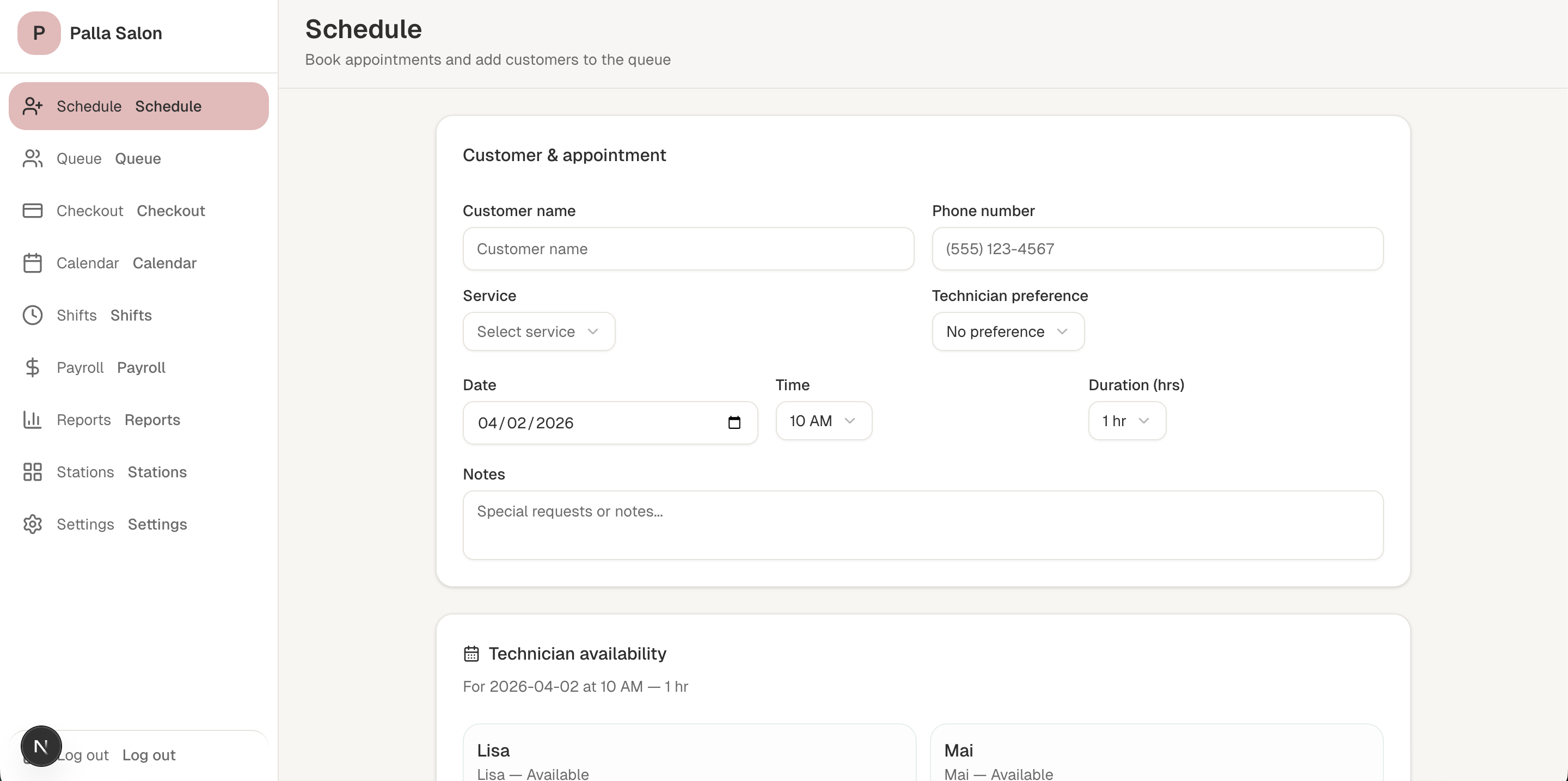
Scheduling appointments with less friction
The scheduling flow was designed for quick front-desk entry. Instead of overwhelming users with too many fields, the form prioritizes the information staff need in the moment: customer details, service, technician preference, date, time, and notes.
- Essential fields only
- Clear form layout for speed
- Technician preference included
- Availability surfaced below the form
Making the queue visible and actionable
The queue screen helps staff quickly understand who is waiting, which technicians are busy, and who is available next. Instead of relying on memory or verbal coordination, the interface supports faster decisions through visible statuses and suggested assignment logic.
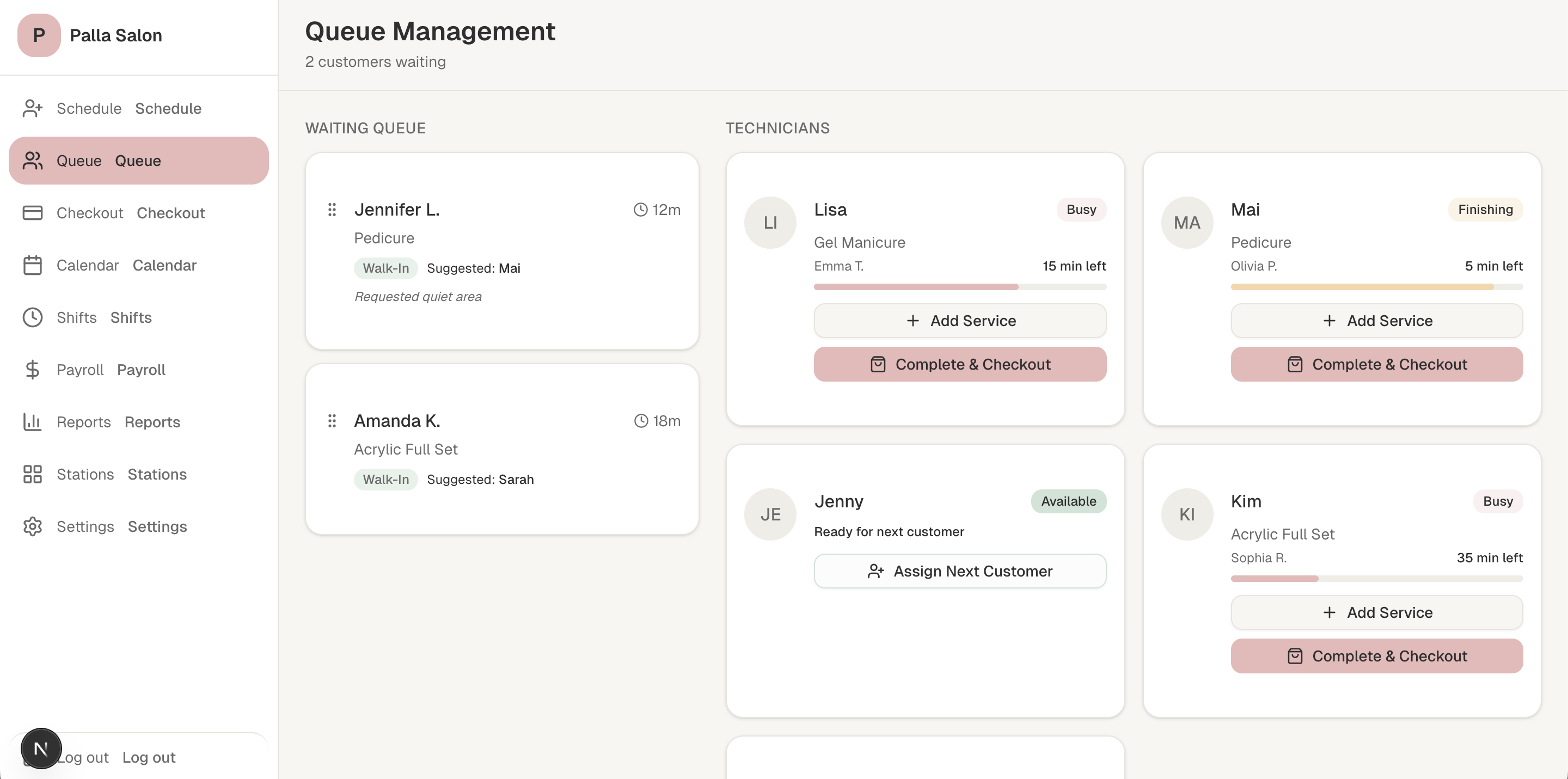
- Waiting customer cards
- Technician status visibility
- Suggested assignment support
- Quick actions for service and checkout
A checkout flow built for speed
Checkout was designed to reduce hesitation and speed up payment interactions. The layout keeps service details, subtotal, tip options, and total amount visually separate so the user can scan and confirm quickly.
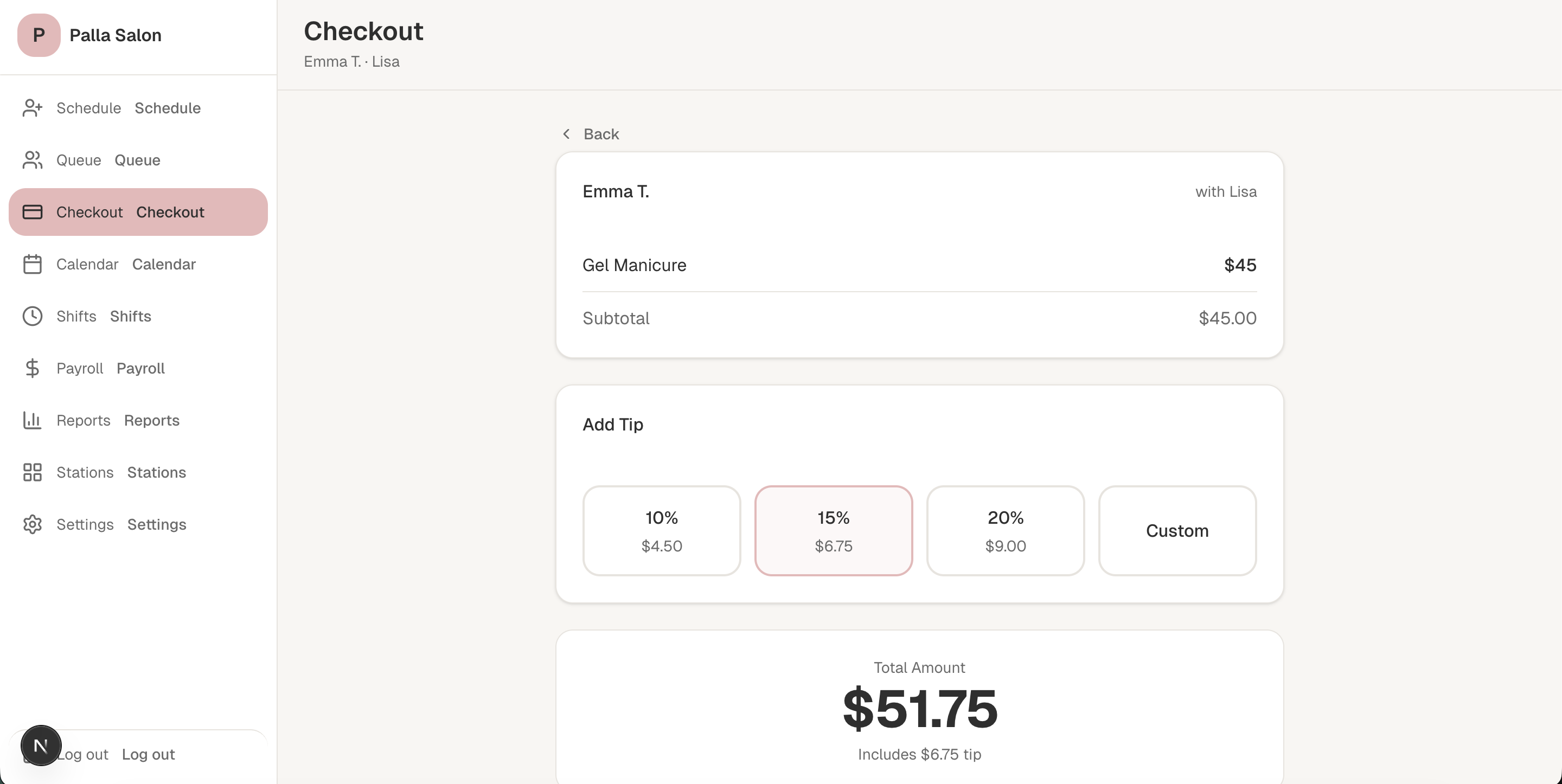
- Clear service summary
- One-tap tip selection
- Large total display
- Minimal distractions
Technician-based scheduling at a glance
The calendar view organizes appointments by technician so staff can quickly see availability throughout the day. This supports faster booking decisions without digging through multiple views.

- Technician columns
- Easy daily scanning
- Clear time-based structure
Tracking shifts and breaks in real time
This screen gives managers visibility into technician availability throughout the day while also allowing staff to check in, check out, and manage breaks.
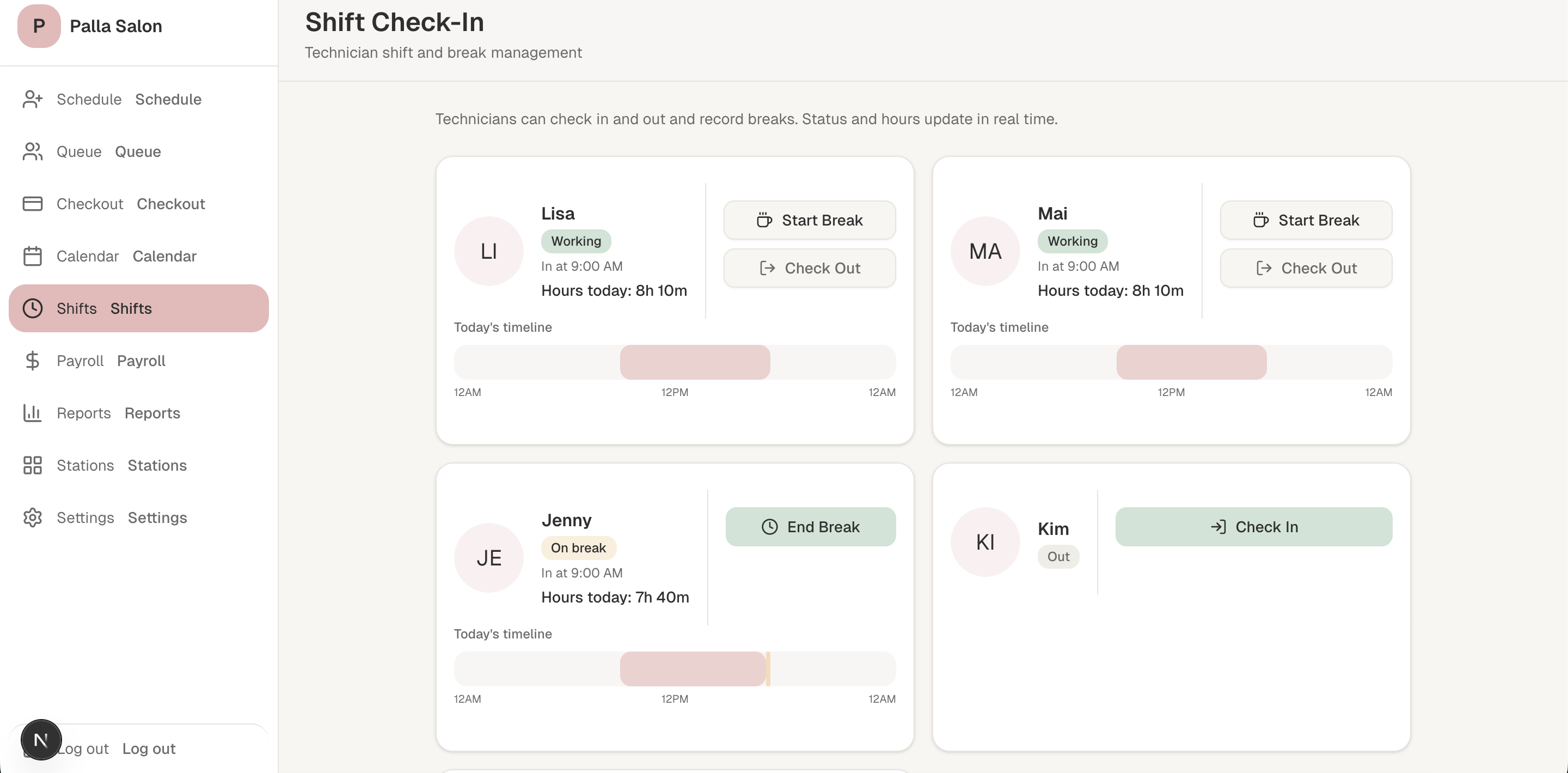
- Real-time status
- Break and shift actions
- Timeline visibility
Giving managers useful operational visibility
Payroll and performance screens help salon owners understand service output, revenue, and technician-level activity without relying on overly complex reports.

- Revenue and tips overview
- Technician ranking
- Individual detail structure
Turning daily activity into readable insights
The reporting screen translates salon activity into easy-to-read metrics and charts. The focus was clarity over complexity so managers can quickly understand business performance.

- Daily revenue summary
- Average ticket visibility
- Service mix breakdown
- Performance visibility
Connecting the software to the physical salon
The station map helps staff track which chairs and tables are available, occupied, or being cleaned. This adds operational visibility beyond scheduling alone.
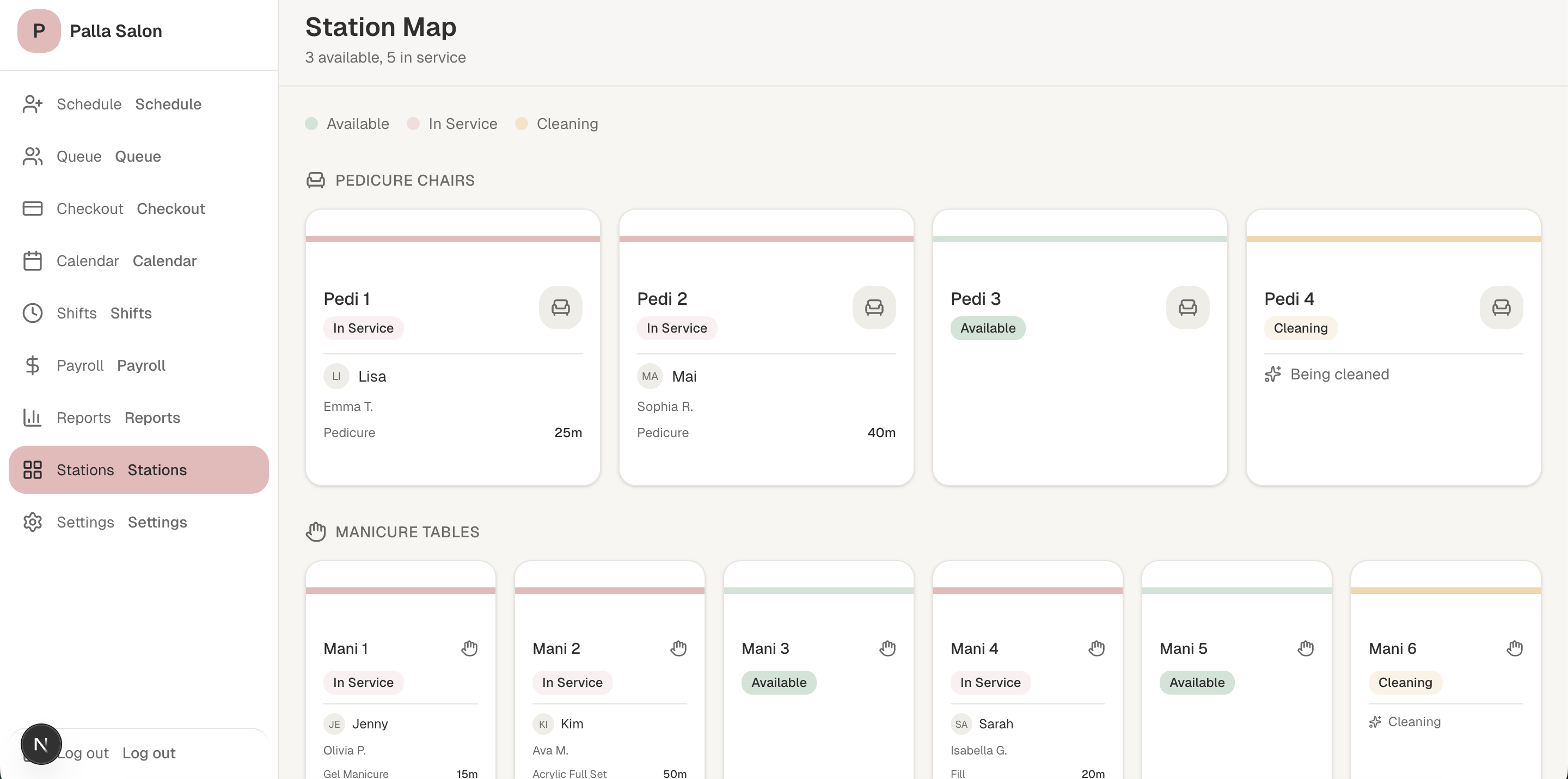
- Physical layout awareness
- Status color coding
- Better service coordination
Manager controls for payroll logic
The settings page supports commission setup and manager-level controls. This helps connect business rules directly to payroll outputs.
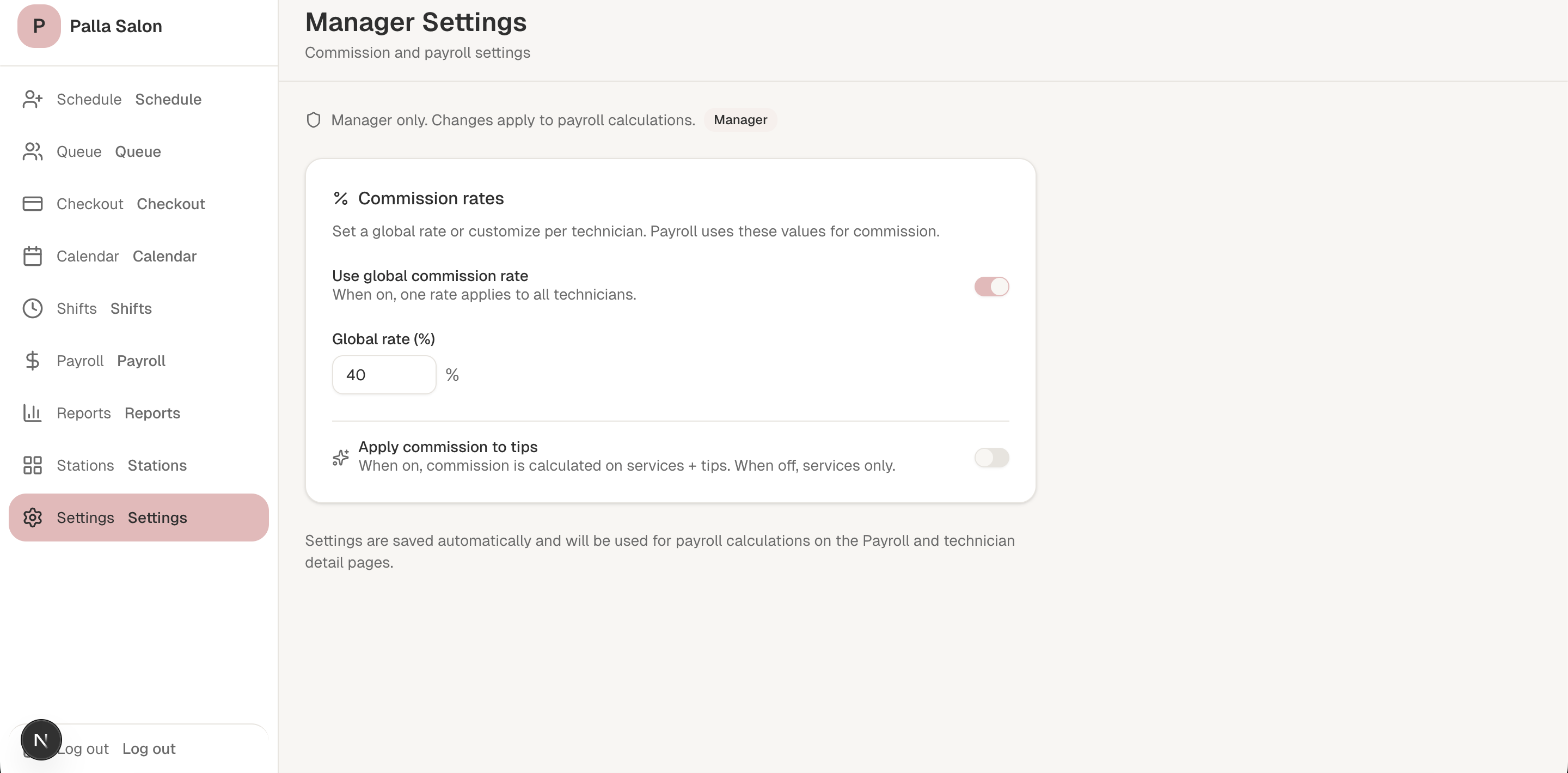
- Global commission rate
- Tip commission option
- Manager-only controls
Design Principles
Speed first
Designed for busy front-desk moments and high-frequency actions.
Low cognitive load
Used simple layouts, clear hierarchy, and minimal friction.
Connected workflows
Booking, queue, checkout, payroll, and reporting work together as one system.
Operational clarity
Supports both staff actions and management visibility.
Expected Impact
This project is still in progress, so I have not framed the outcome as final measured results. Instead, the design direction aims to improve the speed and clarity of common salon operations by reducing unnecessary steps and making real-time information easier to access.
- Faster appointment booking
- Better technician coordination
- Smoother checkout flow
- Clearer business reporting
- Less front-desk friction during peak hours
What I Learned
This project taught me how different operational tools are from consumer-facing apps. In salon environments, clarity and speed matter more than feature density. I also learned the importance of designing connected systems rather than isolated screens, especially when multiple roles rely on the same product throughout the day.
Next Steps
- Test flows with real salon staff
- Refine technician and manager experiences
- Expand responsive behavior for different devices
- Continue improving flow logic and edge cases